Cloud Network Linksys EA9500 MAX-STREAM AC5400 Next Gen MU-MIMO Tri-Band Smart Wi-Fi Router with 8 Gigabit Ports and Seamless Roaming

  • Item Number: EA9500
  • In Stock
  • Price $399.00


Cloud Network Linksys EA9500 MAX-STREAM AC5400 Next Gen MU-MIMO Tri-Band Smart Wi-Fi Router with 8 Gigabit Ports and Seamless Roaming

Wireless speeds up to 5300 Mbps
  • MU-MIMO support 8 Stream a time
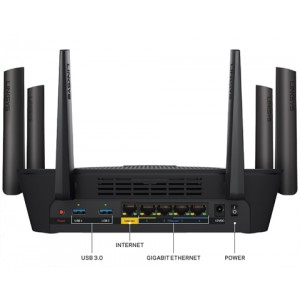
  • 9 x Gigabit ports (8 x LAN + 1 WAN)
  • 8 x Active external fixed antennas
  • Seamless roaming by pairing Max-Stream range extenders

Linksys MAX-STREAM AC5400 Tri-Band Wi-Fi Router (EA9500)

Ideal for busy households and home offices, the Linksys MAX-STREAM AC5400 Tri-Band Router (EA9500) delivers Next-Gen AC Wi-Fi for lag-free productivity and entertainment. MU-MIMO delivers Wi-Fi to multiple devices—4K TVs, streaming media players, game consoles, laptops, tablets, and smartphones—at the same time and same speed, treating multiple devices as if each has its own dedicated router.

The MAX-STREAM AC5400 Router is easy to set up and features three dedicated Wi-Fi bands for combined speeds of up to 5.3 Gbps1 , four simultaneous data streams per band, a powerful 1.4 GHz processor, eight Gigabit Ethernet ports, USB 3.0 and 2.0 ports, and eight adjustable antennas.

Linksys MAX-STREAM AC5400 Tri-Band Wi-Fi Router (EA9500)

Ideal for busy households and home offices, the Linksys MAX-STREAM AC5400 Tri-Band Router (EA9500) delivers Next-Gen AC Wi-Fi for lag-free productivity and entertainment. MU-MIMO delivers Wi-Fi to multiple devices—4K TVs, streaming media players, game consoles, laptops, tablets, and smartphones—at the same time and same speed, treating multiple devices as if each has its own dedicated router.

The MAX-STREAM AC5400 Router is easy to set up and features three dedicated Wi-Fi bands for combined speeds of up to 5.3 Gbps1 , four simultaneous data streams per band, a powerful 1.4 GHz processor, eight Gigabit Ethernet ports, USB 3.0 and 2.0 ports, and eight adjustable antennas.

Next-Gen AC Wi-Fi Lets You Stream, Game, and Work without Interruption

Now you can experience lag-free videoconferencing or file transfers in your home office upstairs while the rest of the family is streaming HD media, surfing the web, and playing online games simultaneously. Efficient MU-MIMO (Multi-User, Multiple-Input, Multiple-Output) technology treats each of your devices as if each has its own dedicated router, ensuring everyone can enjoy Wi-Fi without interruption or buffering.
  • Room-to-Room Wi-Fi with Seamless Roaming

    The MAX-STREAM AC5400 Wi-Fi Router features Seamless Roaming when paired with a MAX-STREAM range extender so enabled Wi-Fi devices will automatically switch to the strongest Wi-Fi signal.2 You won't have to manually connect to the router or range extender when you move from one room to another--or even to your backyard. This means that you can move freely throughout your home while video chatting or streaming videos without experiencing dropped calls or buffering.

    Pair a MAX-STREAM router with a MAX-STREAM range extender for more efficient home Wi-Fi that delivers a stronger, more powerful Wi-Fi signal to all your devices.

  • Blazing-Fast Speeds from Three Wi-Fi Bands

    With three dedicated, independent Wi-Fi bands that offer combined speeds of up to 5.3 Gbps1 , you'll always have the bandwidth you need for your task. Tri-Band technology provides up to double the wireless-AC performance of a dual-band router. Band 1 is 2.4 GHz with speeds of up to 1000 Mbps for older wireless-N and -G devices. Band 2 is a high-speed 5 GHz band for extremely fast file transfers and videoconferencing, while the third 5 GHz band delivers blazing Wi-Fi speeds ideal for online gaming and streaming.
  • Advanced Connectivity with Eight Gigabit Ethernet Ports

    Eight Gigabit Ethernet ports let you connect an array of wired devices for enhanced file transfer speeds and stability—up to 10X faster than Fast Ethernet. Two USB connections—including one fast USB 3.0 port—are ideal for connecting shared storage devices or printers.
 

What is MU-MIMO?

  • MU-MIMO: Like Having a Dedicated Router for Each of Your Devices

     
  • Multi-user, multiple-input, multiple-output (MU-MIMO) technology enables the Linksys MAX-STREAM AC5400 Router to target multiple devices without interference or slowdown--almost like having an individual router dedicated to each of your devices. This allows you and other household members to connect to the Internet, stream media, and play online games simultaneously at faster speeds1 than traditional Wi-Fi.


About Linksys Smart Wi-Fi

  • {"duration":34,"sources":[{"src":"/_cp/products/1459361234406/tab-28c087e5-c54e-4bac-a6d9-f0f4a4646855/2a76bd67-e641-46cb-be23-83234c61d360.mp4.flash.flv","profile":"FLASH","width":960,"height":1706},{"src":"/_cp/products/1459361234406/tab-28c087e5-c54e-4bac-a6d9-f0f4a4646855/2a76bd67-e641-46cb-be23-83234c61d360.mp4.mp4full.mp4","profile":"MP4FULL","width":960,"height":1706},{"src":"/_cp/products/1459361234406/tab-28c087e5-c54e-4bac-a6d9-f0f4a4646855/2a76bd67-e641-46cb-be23-83234c61d360.mp4.mobile.mp4","profile":"MOBILE","width":480,"height":854}],"src":{"src":"/_cp/products/1459361234406/tab-28c087e5-c54e-4bac-a6d9-f0f4a4646855/2a76bd67-e641-46cb-be23-83234c61d360.mp4","width":1080,"height":1920},"customPoster":{"sources":[{"src":"/_cp/products/1459361234406/tab-28c087e5-c54e-4bac-a6d9-f0f4a4646855/bec238cf-c907-4cd8-ae8e-b1df483af353.png.w960.png","width":960,"height":1706},{"src":"/_cp/products/1459361234406/tab-28c087e5-c54e-4bac-a6d9-f0f4a4646855/bec238cf-c907-4cd8-ae8e-b1df483af353.png.w480.png","width":480,"height":853},{"src":"/_cp/products/1459361234406/tab-28c087e5-c54e-4bac-a6d9-f0f4a4646855/bec238cf-c907-4cd8-ae8e-b1df483af353.png.w240.png","width":240,"height":426}],"src":{"src":"/_cp/products/1459361234406/tab-28c087e5-c54e-4bac-a6d9-f0f4a4646855/bec238cf-c907-4cd8-ae8e-b1df483af353.png","width":1080,"height":1920},"runtimeSrc":{"src":"/_cp/products/1459361234406/tab-28c087e5-c54e-4bac-a6d9-f0f4a4646855/bec238cf-c907-4cd8-ae8e-b1df483af353.png.web.png","width":1080,"height":1920},"editorOriginalName":"video_snapshot_1080_v2.png","isAdaCompliant":false},"runtimePoster":{"sources":[{"src":"/_cp/products/1459361234406/tab-28c087e5-c54e-4bac-a6d9-f0f4a4646855/2a76bd67-e641-46cb-be23-83234c61d360.mp4.poster.jpg.w960.jpg","width":960,"height":1706},{"src":"/_cp/products/1459361234406/tab-28c087e5-c54e-4bac-a6d9-f0f4a4646855/2a76bd67-e641-46cb-be23-83234c61d360.mp4.poster.jpg.w480.jpg","width":480,"height":853},{"src":"/_cp/products/1459361234406/tab-28c087e5-c54e-4bac-a6d9-f0f4a4646855/2a76bd67-e641-46cb-be23-83234c61d360.mp4.poster.jpg.w240.jpg","width":240,"height":426}],"src":{"src":"/_cp/products/1459361234406/tab-28c087e5-c54e-4bac-a6d9-f0f4a4646855/2a76bd67-e641-46cb-be23-83234c61d360.mp4.poster.jpg","width":1080,"height":1920},"runtimeSrc":{"src":"/_cp/products/1459361234406/tab-28c087e5-c54e-4bac-a6d9-f0f4a4646855/2a76bd67-e641-46cb-be23-83234c61d360.mp4.poster.jpg.web.jpg","width":1080,"height":1920},"editorOriginalName":"LSWF_App_Screen_Animation_2.mp4","isAdaCompliant":false},"assetWrapper":"rich-features","caption":"Watch How the App Works","showVideoCaption":true,"isAdaCompliant":false}

    Watch How the App Works

    Manage your home Wi-Fi from any mobile device. Home networking just got a lot more fun and easy. The Linksys Smart Wi-Fi app places a powerful suite of Wi-Fi customization tools in the palm of your hand.

    Customize and Manage Your Home Wi-Fi Anytime, Anywhere

    With the Linksys Smart Wi-Fi App, you can closely monitor and manage your home Wi-Fi remotely using a smartphone or tablet.
     
    • Guest Access: Create a separate, password-protected Wi-Fi network for up to 50 guests and easily share the password.
    • Parental Controls: Ensure a safe Internet experience for your kids -- even when you're away from home. Restrict access to inappropriate or distracting content, control usage, and block specific devices from accessing the Internet.
    • Device Prioritization: You can prioritize devices that need the most speed.

    How to Set Up Smart Wi-Fi

    • Set up your home Wi-Fi using a Linksys Smart Wi-Fi Router.

    • Download the free Linksys Smart Wi-Fi App.

    • Use Your Mobile Device to Manage Your Home Wi-Fi.


    Seamless Roaming


    Additional Features

    • Easy Setup

      Getting the AC5400 up and running is simple. Just plug the router into a power source, connect it to your Internet modem and your computer or laptop, connect to the Linksys secure network as shown in the quick start guide, and follow the instructions. No installation CD is required.
    • Eight Antennas for Optimal Wi-Fi Performance

      The router features eight adjustable external antennas that provide powerful streams of data to your devices, ensuring far-reaching Wi-Fi coverage. Unlike the two or three data streams found on standard routers, the AC5400 delivers four simultaneous streams on each of the three Wi-Fi bands for stronger, faster performance.
    • Powerful Dual-Core Processor for Efficient Operation

      Enjoy gaming without interruption from other networked devices. The MAX-STREAM AC5400 Router is powered by a 1.4 GHz dual-core processor that delivers the performance necessary for activities like multiplayer online gaming. The AC5400 is capable of handling multiple high-speed data streams at once--delivering faster Wi-Fi speeds to more devices.
    • Targeted Signals Improve Wi-Fi Connections

      The AC5400 improves wireless signal range by sending focused Wi-Fi signals to each mobile device, also known as Beamforming Technology. This increases the efficiency of your home Wi-Fi, enabling multiple household members to enjoy simultaneous high-bandwidth Wi-Fi activities like streaming, surfing, and gaming.
     
    1. 1 The standard transmission rates—1000 Mbps or 2166 Mbps (for 5 GHz), 1000 Mbps (for 2.4 GHz), 54 Mbps, and 11 Mbps—are the physical data rates. Actual data throughput will be lower and may depend on the mix of wireless products used and external factors.
    2. 2 Seamless Roaming is designed for devices that support the 802.11k standard including but not limited to iPhone (4s and later), iPad Pro, iPad Air and later, iPad mini and later, iPad (3rd generation and later), iPod touch (5th generation and later), Samsung S4 (Android 4.2.2 /4.4.2), Samsung S5 (Android 4.4.2), and Samsung S6 (Android 5.0.2). For more information on supported Windows and other devices, please check with your device manufacturer.

    Datail:
     
    Standards 802.11b
    802.11a/g
    802.11n
    802.11ac Security 64 / 128-bit WEP, WPA2 Personal, WPA2 Enterprise WPA/WPA2 WPA2 WAN Ports 1 x 10/100/1000M LAN Ports 8 x 10/100/1000M LEDs Status Indicator, MU-MIMO Indicators, illuminated Linksys logo, Wi-Fi, Wi-Fi Protected Setup, Power, Internet, LAN 1-8, USB 3.0, USB 2.0 Wireless Data Rates AC5400 (N1000 + AC2166 + AC2166) Operating Range Very Large Household Frequency Band 2.4 GHz / 5 GHz / 5 GHz Antenna 8 x External adjustable antennas Interface 1 x USB 3.0
    1 x USB 2.0 Power Adapter Input: 100-240V ~ 50-60Hz
    Output: 12V, 5A Processor 1.4 GHz Dual-core System Requirements MacOS (10.X or higher), Windows 7, Windows 8.1 Dimensions 2.62" x 12.53" x 10.41" Weight 3.81 lbs.

    Features

    |
    Features
    Tri-Band (5 GHz + 5 GHz + 2.4 GHz)
    4x4 AC, MU-MIMO
    Advanced Security
    USB 3.0 Port
    Dual-Core CPU
    Beamforming Technology
    8 Adjustable Antennas
    Smart Wi-Fi

    Packaging

    |
    Package Contents
    Linksys AC5400 Tri-Band Wi-Fi Router, EA9500
    Quick Start Guide
    8 Antennas
    Ethernet Cable
    Power Adapter
    CD-ROM with Documentation

Write a review

Please login or register to review

Related Products

Tags: Cloud Nework